16. DNS Filtering in Modern Networks
16.1 Introduction to DNS Filtering
DNS filtering is a powerful technique used to control access to internet domains by intercepting and analyzing DNS queries. By defining policies to block or allow specific domains, DNS filtering enables organizations and individuals to achieve enhanced security, productivity, and compliance.
ChiefNET integrates DNS filtering with curated blocklists to provide flexible, robust domain filtering for diverse use cases. These blocklists categorize domains into meaningful groups, ensuring efficient filtering and enabling fine-grained control over internet usage.
16.2 Configuring DNS Filters
All DNS filters are set up on every device belonging to an organization.
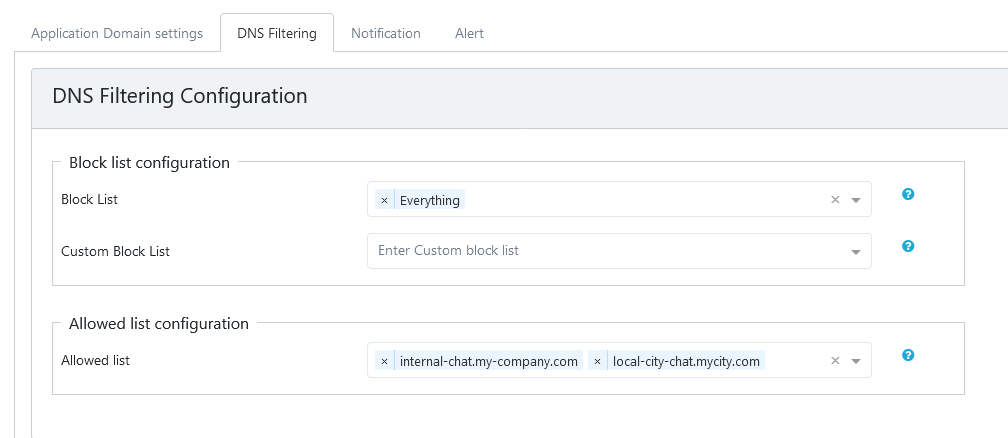
- Log in as a Customer Admin, and navigate to "Settings" and then to "DNS Filtering"
- Here select the categories you want to block one at a time. Each list is called a blocklist because it lists the domains that should be blocked from getting resolved.
- Each blocklist consists of a number of domains that are considered as a bad domain or a malware domain or something that is unwanted. If you wish to block all bad domains in one shot, select Everything as the domain list to be blocked.
- If there are domains that are essential for your organizations and if they are part of the domain blocklist, type in those one at a time, on the 'Custom Allow List'. These domains will be resolved as appropriate without getting blocked.
- If there are additional domains that should be blocked, enter those domains, one at a time on the "Custom Block List".
- All the blocklists are are updated periodically on all devices of all organizations automatically.
- Wildcards are not supported in the Custom Allow List or Custom Block List.
- Ensure that the changes are saved to the cloud.
Example Configuration Screen Capture:
16.3 Domain Classifications and Descriptions
The following categories represent the classifications supported by the blocklist project used in our product. Each category is carefully curated to address specific use cases.
Note that these are general descriptions. The domain categories may change over time. ChiefNET automatically updates the domain lists and provides new categories with curated lists. These lists are shared worldwide for safe use of the Internet.
- Malware
- Description: Domains known to distribute malicious software such as viruses, ransomware, and trojans.
- Purpose: Protects against threats by preventing access to sites hosting malware or exploiting vulnerabilities.
- Phishing
- Description: Websites designed to steal sensitive information by mimicking legitimate entities.
- Purpose: Shields users from credential theft and fraudulent activities.
- Spyware/Adware
- Description: Domains associated with software that monitors user behavior or serves intrusive ads.
- Purpose: Ensures user privacy by blocking tracking and advertising domains.
- Adult Content
- Description: Sites hosting explicit or adult-only material.
- Purpose: Implements parental controls and ensures family-friendly environments.
- Social Media
- Description: Platforms such as Facebook, Twitter, and Instagram.
- Purpose: Enhances productivity by limiting access to non-essential services.
- Streaming and Entertainment
- Description: Domains providing video, audio, and gaming content (e.g., YouTube, Netflix, gaming servers).
- Purpose: Manages bandwidth usage and reduces distractions in professional or educational settings.
- Cryptocurrency
- Description: Domains related to cryptocurrency trading, mining pools, or exchanges.
- Purpose: Mitigates unauthorized cryptocurrency mining and prevents access to risky trading platforms.
- Health and Wellness
- Description: Websites offering medical advice, health products, or wellness content.
- Purpose: Blocks unreliable or pseudoscientific sources and ensures access to trusted health information.
- E-commerce
- Description: Online shopping portals and marketplaces.
- Purpose: Controls access to shopping sites to manage spending or enforce organizational policies.
- News and Media
- Description: Domains providing news articles or blogs.
- Purpose: Filters biased or controversial content and curates trusted sources for consumption.
- Advertising
- Description: Ad networks and domains used for serving advertisements.
- Purpose: Blocks intrusive ads and improves browsing performance.
- Trackers
- Description: Domains that collect user data for analytics and tracking purposes.
- Purpose: Enhances privacy by preventing data collection and user profiling.
- Custom Categories
- Description: User-defined categories tailored to specific organizational or personal needs.
- Purpose: Enables bespoke filtering to accommodate unique use cases, such as partner domains or project-related portals.