7. Ports and Interfaces
This section provides detailed information about the ChiefNET networking device, focusing on its features, configuration, and typical use cases. ChiefNET is designed to support various networking interfaces and configurations, making it a versatile choice for different networking needs.
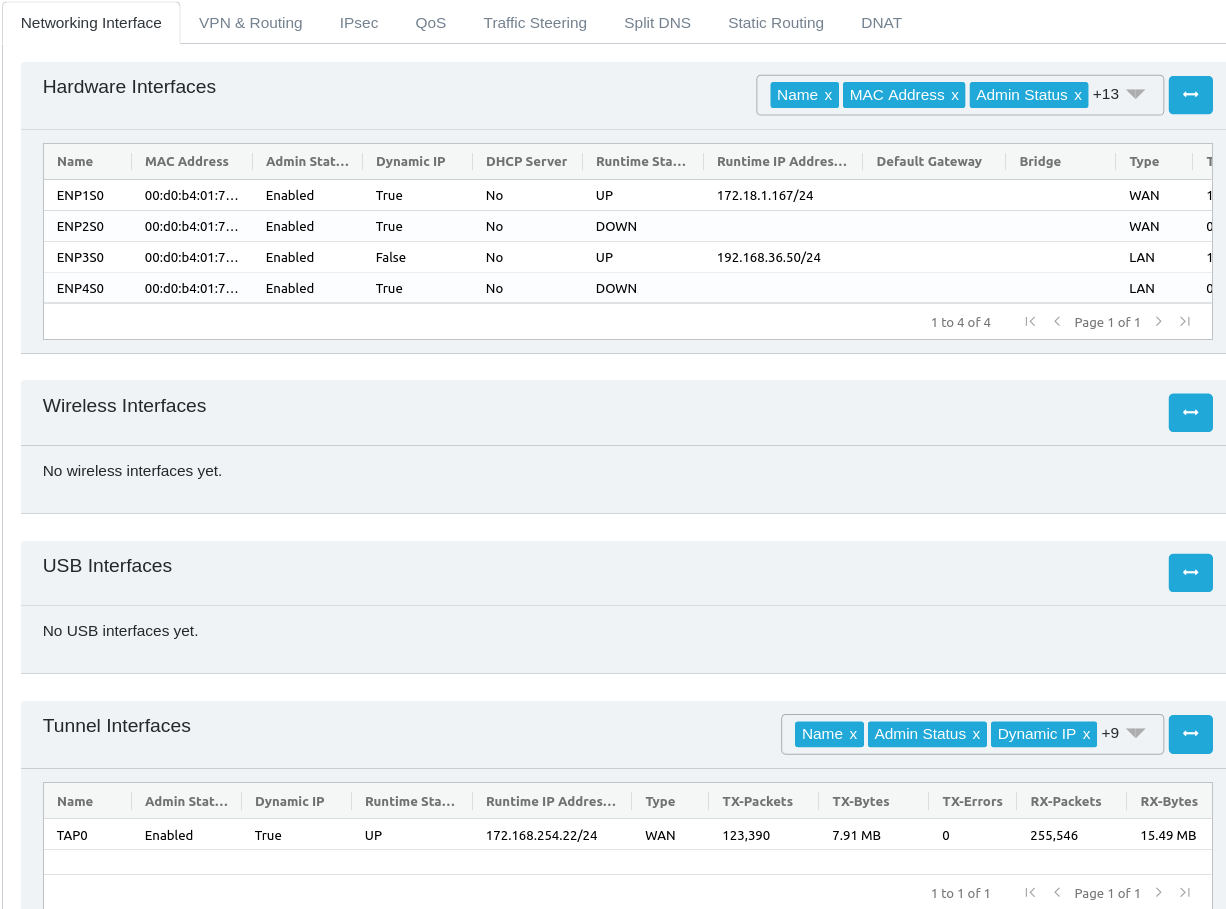
ChiefNET supports Ethernet, VLAN, Bridge, LTE and other USB-based network interfaces. In addition, the Network Interface tab on the Orchestrator WebUI displays tunnel interfaces used for site-to-site (i.e branch-branch or branch-HQ) connections.
7.1 Tunnel Interfaces
Tunnel interfaces are displayed on the 'Network Interfaes' tab with status and metrics, but are configured on their own tab titled 'VPN and Routing'. These tunnel interfaces are all enabled for OSPF-based dynamic routing by default and automatically, and are used for Enterprise traffic (i.e. site-to-site traffic)
7.2 IPsec Interfaces
IPsec interfaces are configured on their own tab titled IPsec for both IPsec server and IPsec client settings. IPsec interfaces are also used for site-to-site (aka branch-branch connectivity.
A special type of IPsec interface is 'Prisma' which is an IPsec client interface to the Prisma Cloud that offers advanced firewall capabilities. If your organization is interested in utilizing the Prisma connectivity, please contact the ChiefNET team for more information.
7.3 Ethernet Interfaces
- Description: ChiefNET supports Ethernet interfaces, with all ports offering gigabit speeds unless specified otherwise.
- Typical Use: Ethernet interfaces are commonly used for direct, high-speed connections to computers, servers, and other network devices.
7.4 VLAN Interfaces
- Description: VLAN (Virtual Local Area Network) interfaces allow for logical separation of networks within the same physical network.
- Use Cases:
- Segregating network traffic for enhanced security.
- Organizing network resources and traffic for different departments or project teams.
- Reducing network congestion by isolating broadcast domains.
7.5 Bridge Interfaces
- Description: Bridge interfaces are used to connect multiple network segments, operating at the data link layer (Layer 2) of the OSI model.
- Use Cases:
- Interconnecting VLANs or Ethernet ports.
- Extending the range of a network by connecting multiple LAN segments.
7.6 Port Configuration and Models
7.6.1 Default Port Configuration
- Standard Model: Comes with 2 WAN ports and 2 LAN ports.
- 6-Port Model: Features 6 Gigabit Ethernet ports, with the first two set as WAN and the remaining as LAN ports.
- Virtual-CPE and Cloud-CPE Models: These models support virtual Ethernet interfaces as defined by the hypervisor or cloud vendor.
7.6.2 WAN and LAN Ports
- WAN Ports: Configured as DHCP clients by default. They should be connected to the firewall or to the ISP devices towards the WAN side (MPLS, ILL, Internet, Broadband).
- LAN Ports: Typically assigned static IP addresses. Optionally, a DHCP server can be enabled. These should be connected to the LAN side devices.
Note that in some deployments, ChiefNET's WAN port is connected to the corporate firewall's LAN port, and the firewall is connected to the ISP devices. In other deployments, it is the opposite i.e. ChiefNET's LAN port is connected to the firewall and ChiefNET's WAN port is connected to the ISP devices. Both kinds of deployments are supported. However, in order for WAN features such as failover and load-balancing to work, ChiefNET will need to have direct layer-2 connectivity to the ISP devices.
Traffic engineering rules and Quality of Service (QoS) are primarily applied to traffic moving from LAN to WAN, considering WAN as a potential congestion point and to manage runtime costs.
Both VLAN and Bridge interfaces can be configured as either WAN or LAN interfaces, offering flexible network topologies.
IP addresses can be assigned to Ethernet interfaces, VLAN interfaces, or Bridge interfaces.
7.7 LTE Interface Support
- Built-in LTE: Availability depends on the product model.
- USB-based LTE: Supported through USB ports, typically provided by the service provider.
- Device Compatibility: Not all LTE devices are supported. Users must ensure that their preferred ISP's LTE devices are qualified by ChiefNET.
7.8 USB-based Interfaces
USB Based wifi and Ethernet network innerfaces are supported at this moment for diagnostic purposes only and are set up by ChiefNET support staff to help with troubleshooting.
7.9 Managing Network Interfaces via Orchestrator WebUI
On the Orchestrator webui, the Network Interfaces tab provides a number of tables, listing all physical Ethernet interfaces, VLAN, Bridge and LTE interfaces. Current status and statistics for each interface are displayed.
The user may provide a custom name and description for the interfaces to facilitate easier understanding of the network deployment. Each interface may be configured with the IP addresses either in the DHCP-client mode or a static-IP addressing mode.
It is possible to configure DHCP server as well on an interface when static IP addressing is used.